
AI Karaoke Maker from YouTube with Synchronized Lyrics
An AI karaoke maker from a YouTube link you have the rights to, or from your own file: the vocal is removed, the lyrics are timed to the singing, and you download the video.
- Runs on our server. Your upload is deleted within 24 hours.
- Hear a real result first
You get a video with the backing track and the lyrics in time, plus the lyrics as .lrc and .srt.
WAV · AIFF · FLAC · MP3 · M4A · OGG · MP4 · MOV · MKV · up to 25 minutes and 500 MB
Checking your runs
Your file is processed on a cloud GPU by our processing partner and deleted there within 24 hours; the vocal alone is sent there once more to read the words. We keep the results for 24 hours so a repeat is free. The video is written in your browser and is never uploaded. Unless you choose your own lyrics, published lyrics are looked up on LRCLIB, an open lyrics database, when you press Find published lyrics and by themselves after a link: only the song’s title and artist are sent, nothing of your audio.
Use a recording you made or have the rights to use, and lyrics you may use in a video. The words are read from the singing, and you can correct every line before the video is written.
Hear a real result first
“Flotsam” by Josh Woodward, music and lyrics CC BY 4.0. 18 seconds of the video this page wrote from the full song: the vocal removed here, the artist’s published lyrics timed to the singing here. Nothing is retouched.
How it works
- What it does
- Removes the vocal from your song, reads the words of the vocal with the time of each one, and writes a video in which every line fills with colour as it is sung. Before the video is written you can correct the words, move any line, use your own lyrics or an .lrc file, and choose the colours or your own picture.
- Model
- A separation model on a cloud GPU takes the vocal out, the same one the vocal remover uses. A speech model then reads the vocal alone and a second model places each word in time. Sung words are harder to read than spoken ones, so expect to correct some. Model names and licences
- Source
- A song or a video file up to 25 minutes (MP3, WAV, FLAC, M4A, MP4, MOV, MKV, WebM and more); only the sound of a video is used. A YouTube or SoundCloud link also works, and so does a Spotify, Apple Music, Deezer or TIDAL link: those services give no audio, so the same recording is found on YouTube and you are shown which upload it is before anything runs. Links are for recordings you own or have the rights to use.
- Output
- A 1280 × 720 video with a small voice-remover.com mark in the corner, or 1920 × 1080 with no mark on Pro, Pro+ and the Pro pass; 30 frames a second, MP4 where your browser can encode it and WebM otherwise. Also the lyrics as .lrc and .srt, and the instrumental file.
- Time
- 1 to 3 minutes to remove the vocal (our runs took 90 to 162 seconds) and under 20 seconds to read the words. The video is written on your computer.
- Your file
- Your file is processed on a cloud GPU by our processing partner and deleted there within 24 hours; the vocal alone is sent there once more to read the words. We keep the results for 24 hours so a repeat is free. The video is written in your browser and is never uploaded. Unless you choose your own lyrics, published lyrics are looked up on LRCLIB, an open lyrics database, when you press Find published lyrics and by themselves after a link: only the song’s title and artist are sent, nothing of your audio.
Make a karaoke video with synced lyrics
Flotsam, Josh Woodward · CC BY 4.0 · real output from this tool
The vocal comes out
The song is split into the vocal and the backing track by the same separation model as our vocal remover. The video plays the backing track. A guide-vocal slider can leave some of the original singer in, anywhere from none to all, for learning a song before you sing it alone. The instrumental also downloads on its own, the same file the vocal remover would give you.
Lyrics timed to the singing
A speech model reads the separated vocal and, for English songs, a second model gives every word a start and an end, so each line fills with colour as it is sung. On our 3-minute folk-rock test song the words differed from the artist's published lyrics in 3 of 161 words, and line starts were a median 31 ms from the moment the voice came in. Lines break where the singer breathes, and a line too long for the screen wraps onto two rows. Before a line that follows a break of more than five seconds, three dots count you in.
Every line can be corrected
Change the words of a line, move it 0.1 s at a time, start it at the playhead, or tap along to re-time the whole song. Paste your own lyrics and they are fitted to the singing word by word; an .lrc file loads as it is. The preview draws the same frames the file gets, so what you check is what is written. One button moves every line 0.1 s earlier or later when the whole song is off by the same amount, and every edit can be undone, sixty steps back.
How to make a karaoke video from a YouTube song
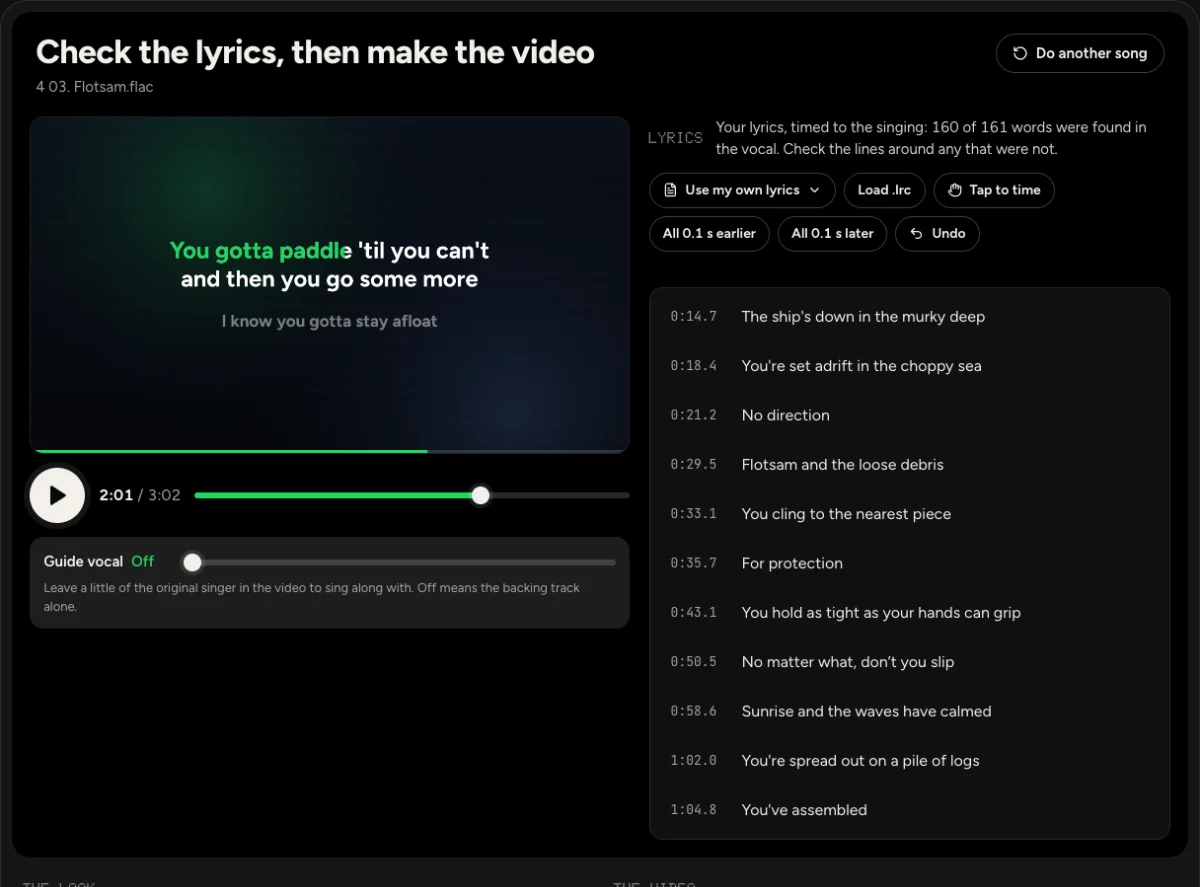
Bring the song
Drop a song or a video file of up to 25 minutes and 500 MB, or paste a link to a recording you own or have the rights to use: YouTube, SoundCloud, Spotify, Apple Music, Deezer or TIDAL. From a video, only the sound is used.
Check the lyrics
Removing the vocal takes 1 to 3 minutes and reading the words under 20 seconds. Play the preview, fix misheard words and move any line that starts early or late. Add the title and the artist, which show on a card until the first line, then pick one of four colour themes or put your own picture behind the words.
Make the video
The video is written in your browser at 30 frames a second: 1280 × 720 with a small voice-remover.com mark in the corner, or 1920 × 1080 with no mark on a paid plan. On the laptop we tested with, a 3-minute song took 17 seconds. Play it on the page, then download it, with the lyrics as .lrc and .srt if you want them.
Who makes karaoke videos
Singers and karaoke hosts
Turn a track you are allowed to use into a video with the words on screen, in the key and the arrangement of the recording you already know.
Songwriters and bands
Publish a sing-along version of your own release: your lyrics as you wrote them, your colours or cover art, and a video file ready to upload to your channel.
Teachers and choir leaders
Give a class the words in time with the music, with the guide vocal left in at a low level until everyone knows the tune.
Karaoke video questions
Can I make a karaoke video from a YouTube link?
Yes, where link import is offered. Paste the link, tick the box that says you own the recording or have the rights to use it, and the sound is fetched for you; the copy on our server is deleted after 24 hours. Without that right, do not use the link. A Spotify, Apple Music, Deezer or TIDAL link works too: those services do not hand out audio, so the same recording is looked for on YouTube, accepted only when its length is within 4 seconds, and named on the page before you start. If the video is yours, you can also download your own file from YouTube Studio and drop it here.
Where do the lyrics come from?
After the vocal is separated, a speech model transcribes what it hears and an aligner assigns each word a start and end time. Where this site offers it, and unless you choose your own lyrics, the editor also looks up the published lyrics of a named song in LRCLIB, an open lyrics database, when you press Find published lyrics or by itself after a link, and fits them to the vocal. Automatic word timing covers English songs for now; in other languages the words keep the rough time of each phrase. You can edit the words, paste a set of lyrics you have permission to use, or load a timed .lrc file.
How accurate are the words and the timing?
Sung words are harder to read than speech, so expect to correct some, and more of them in dense mixes, rap, choirs or heavily processed vocals. On our folk-rock test song the model differed from the artist's published lyrics in 3 of 161 words, and the 26 lines that begin after a breath started a median 31 ms from the voice, 90% of them within 128 ms. One held phrase in that song was placed 3 seconds early by the model; the page caught it from the vocal and moved it onto the singing. A 4-minute funk song with fast, half-spoken verses did worse: about a quarter of its lines were 0.2 to 0.6 s from the nearest voice onset, and the same chorus came out with different words each time, so some were wrong. A track with no singing is recognised from its vocal file and gets no words at all, where a speech model left alone would invent some.
Can I use my own lyrics?
Yes. Paste them one sung line per row and each word takes the time of the word heard at that place in the vocal, so your spelling and your line breaks replace the model's while the timing stays. With the artist's own lyrics for our test song, 160 of 161 words were found in the vocal. You can also load an .lrc file, or time the lines yourself by tapping along. Section labels such as [Chorus] are ignored.
Which languages work?
Automatic timing is for English songs only for now: English is the language we have measured, and its word aligner is licensed for commercial use. For a song in another language, the words the speech model hears are kept with the rough time of each phrase, and the page says so; no other aligner is used. Pasted lyrics, .lrc files and tapping each line into place work in any language, and the video is written the same way.
What do I get, and in which format?
A video with the backing track and the lyrics: MP4 with H.264 picture and AAC sound in Chrome, Edge and Safari, and WebM where a browser cannot encode MP4. Free videos are 1280 × 720 with a small voice-remover.com mark in the bottom-right corner; Pro, Pro+ and the Pro pass make them in 1920 × 1080 with no mark. Both are 30 frames a second; our 3-minute test came to 38 MB at 720p, with the picture at 1.5 Mbit/s; the sound is AAC, about 180 kbit/s from Chrome and about 105 from Safari. The lyrics also download as .lrc and .srt, and the instrumental as its own file.
Is my song uploaded?
The song is, so the vocal can be removed: it is processed on a cloud GPU by our processing partner and deleted there within 24 hours, and the vocal alone is sent there once more to read the words. The video is drawn and encoded in your browser and never leaves your computer. A song imported from a link is fetched by our server and deleted from it after 24 hours.
Can I publish the video?
Only if you may use the song. Removing a vocal and adding lyrics changes nothing about who owns the recording, the composition or the words. Use your own music, music you have licensed, or music whose licence allows it, and credit it the way the licence asks. Our example uses a song its artist published under CC BY 4.0.
Explore more tools
All 50 tools →Stems and vocals20 available · 2 coming soon
- Vocal remover
- Stem splitter
- Karaoke maker
- Acapella extractor
- Instrumental maker
- Background music remover
- Drum remover
- Bass remover
- Piano remover
- AI Guitar Remover
- Lead and backing vocal splitter
- Pro separation
- Audio separator
- Dialogue remover
- Speech, music and effects splitter
- Remove background music from video
- Violin extractor
- String instrument remover
- Wind instrument remover
Another song? Drop it here.
It goes straight into the YouTube karaoke video maker.