
Nightcore maker
Make a song faster and higher, with the level kept and peaks limited to −1 dBTP.
- Runs in your browser. Nothing is uploaded.
- Space plays AB switch versions
You get the nightcore edit, ready to play and download.
WAV · AIFF · FLAC · MP3 · M4A · OGG · up to 15 minutes and 600 MB
Runs in your browser. Nothing is uploaded.
How it works
- What it does
- Faster and higher, the nightcore way, with the level kept and the peaks limited to −1 dBTP. Rendered in your browser.
- How it works
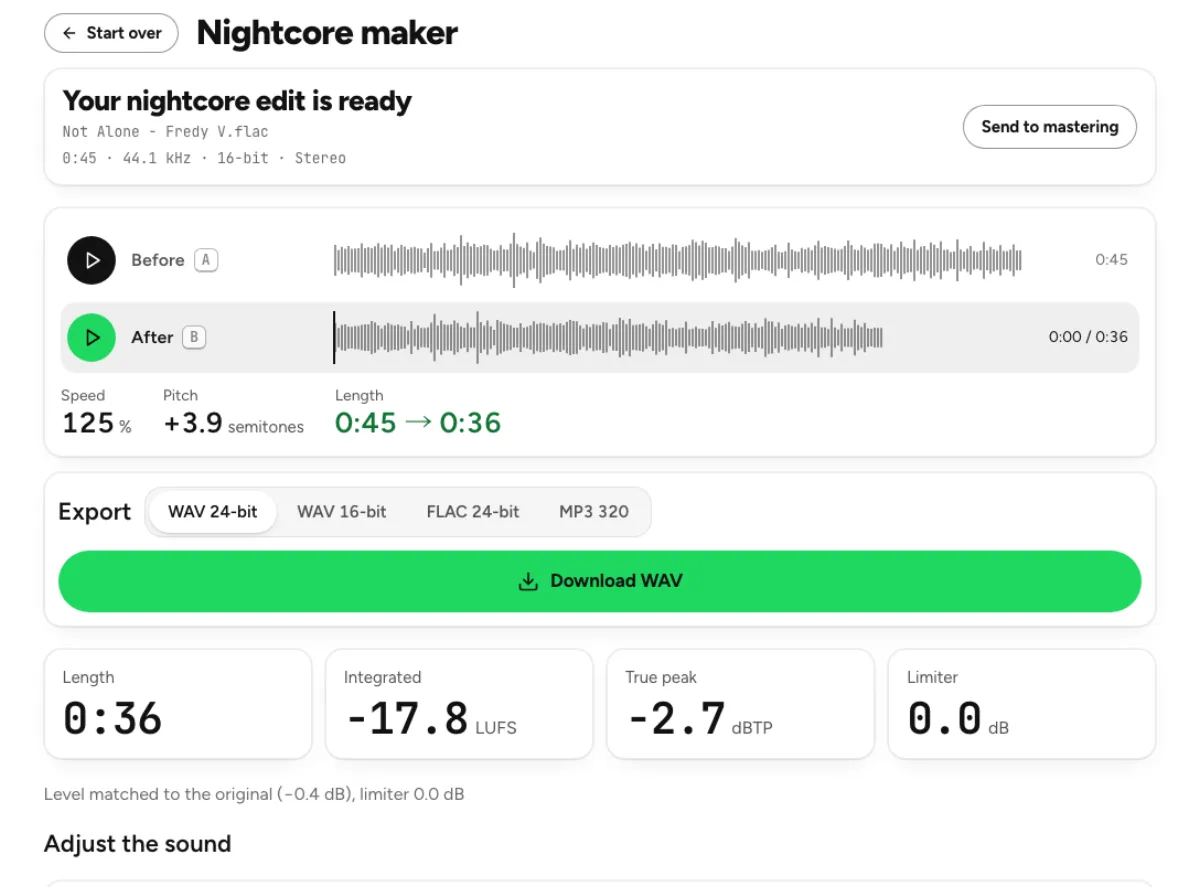
- Speed is a band-limited resample, so 1.25 is +3.9 semitones. The output is brought back to the input's integrated loudness and a true-peak limiter holds the peaks at −1 dBTP, so nothing clips. Tempo only uses Signalsmith Stretch to keep the pitch.
Speed, pitch and level in one deliberate edit
A sped-up sound you can place
The speed range runs from 110 to 135 percent, with the classic starting point at 125 percent. With pitch following speed, the recording becomes shorter and higher together. The page shows the musical pitch shift instead of hiding it behind a vague intensity label. A small increase may suit one track while a larger change makes another vocal feel strained or unfamiliar. Compare the hook and the busiest passage before deciding that the fastest setting provides the most useful version.
A choice between higher pitch and tempo only
Classic nightcore behavior links speed and pitch, changing both the pace and the character of the recording. Tempo only uses time stretching to make the music faster while retaining its nominal key. That can be helpful when you want more movement without the higher voice, but it is a different creative result. The tool processes the complete recording, so drums, bass, vocal and effects all participate. It is not a way to speed one instrument independently inside a stereo mix.
Level checks after the speed change
The processed result is brought toward the original integrated loudness and uses true-peak limiting before export. This avoids treating a louder render as automatically better and makes the effect easier to compare. The result reports duration, loudness, true peak and limiter activity so you can see the cost of the processing. A controlled peak does not guarantee transparent sound: listen for altered attacks, brittle cymbals or an overly sharp vocal, particularly at the more extreme end of the speed range. Compare several neighboring speeds when the change is intended for a particular scene or activity. A small adjustment may keep the singer’s articulation clearer than the default while still providing the energy you need. Track the shortened duration and any pitch-preserving choice in the output name or project notes. That makes it easier to reproduce an edit or explain it to a collaborator without relying on a memory of the preview. More speed is a creative option, not a measure of completion.
Who makes sped-up music versions
Video editors fitting an energetic sequence
Test a sped-up version against the actual picture rather than choosing speed in isolation. A shorter phrase can support a faster cut, but it can also move an important musical accent away from the intended visual moment. Confirm the result’s duration in your editor and listen to the ending. Use material you have permission to distribute; a nightcore transformation does not provide a new license for the underlying song. Keep the original source and document which version was used in the timeline.
Listeners building a faster practice or workout version
A modest speed increase may better suit a particular activity or help you rehearse a phrase above its original pace. Use Tempo only if the original key is important, or keep linked pitch for the familiar sped-up character. Listen at a comfortable level instead of raising playback volume to match the extra energy. The export is a new file, so keeping it beside the original lets you choose the version appropriate to the situation without replacing the source.
Producers testing a demo at another pace
A fast render can reveal whether a hook gains momentum or becomes crowded at a higher speed. Treat that as an arrangement test before committing to a session-wide tempo change. If the raised pitch contributes most of the appeal, compare that separately with an independent pitch change. If timing is the main benefit, try Tempo only. The browser version is a useful reference, but rebuilding or replaying individual parts can offer more control for a final production.
How to make and check a nightcore edit
Load and listen to the original
Choose a supported recording within the displayed 15-minute and 600 MB limits. The first render starts from the default speed after the browser reads the file. Listen to the source so you know which vocal character and rhythmic accents you want to retain. Use the available demo when learning the comparison controls. Since processing is local, your device handles decoding and rendering; a large file or a slower device may need more time before the processed playback becomes available.
Choose speed and pitch behavior
Start with the preset nearest your goal, then move the speed slider and decide whether Tempo only should be on. The displayed pitch shift explains what linked playback does to the notes. Let the updated version finish rendering, then compare it against the original at matched level. Check a busy chorus rather than only an exposed introduction. A fast setting that initially sounds exciting can make articulation, percussion and background detail less distinct over a longer passage.
Review the result and export
Read the new length, integrated loudness, true peak and limiter information before saving. Listen for the musical changes as well as technical artifacts. If the version feels too sharp, try a smaller speed increase or Tempo only rather than compensating blindly with more processing. Export a supported WAV, FLAC or MP3 result and play the downloaded file in your next application. Keep the original separately and avoid repeatedly re-encoding successive compressed drafts as you refine the edit.
Nightcore speed, quality and export questions
What makes a version nightcore?
The familiar effect combines faster playback with a higher pitch. This page starts at 125 percent speed and lets you adjust within the displayed range. There is no rule that every song needs the same percentage. Judge the phrasing, vocal character and overall pace, and use a more moderate setting when the default makes the arrangement feel rushed.
Can I speed a song up without the higher voice?
Yes. Enable Tempo only to use time stretching while retaining the nominal pitch. This creates a faster version with a different character from linked nightcore playback. Compare consonants, cymbals and other attacks because time stretching can affect their texture. If you need a wider set of independent pitch and tempo choices, use the pitch changer.
Will speeding up change the length?
Yes. A faster performance takes less time, and the result displays the new duration. That matters when fitting a video, workout sequence or existing session timeline. Verify the actual exported file in the destination application. Changing playback speed is different from cutting a specific section; use the audio cutter when you need an editorial excerpt rather than a faster complete recording.
Does the limiter guarantee the result sounds clean?
It controls peaks, but it cannot guarantee that every source and speed setting sounds natural. Existing distortion, dense limiting in the source and aggressive speed changes can remain audible. Use the matched comparison and listen beyond the first impression of extra energy. Try a smaller change when the voice becomes brittle or the percussion loses its shape.
Can I change just the vocal speed?
Not from a complete stereo mix on this page. The speed operation affects the whole recording. Separate a vocal or instrument first if you need to work on that part independently, then review any separation artifacts before changing its speed. Recombining altered parts is an arrangement and timing task, not something the nightcore maker automatically solves for you.
What export format should I keep?
A WAV or FLAC working copy is useful when you will edit or encode the result again. The supported MP3 option is convenient when the receiving workflow needs a smaller compressed file. Exporting to a lossless container stores the processed version without another lossy encode, but it cannot restore information missing from the source or undo the intentional speed change.
Does making a nightcore edit upload my audio?
No. This page performs the speed change, level handling and export locally in the browser. It does not submit the recording to a cloud generation or separation job. Device memory and processing speed therefore affect completion time. Save the output before closing the tab, and consider any separate cloud feature as an additional operation with its own behavior.
Can I publish a transformed commercial song?
The tool changes audio; it does not grant rights to an underlying recording or composition. Use material you own or have permission to adapt and distribute, and check the requirements of the destination where you plan to publish. A faster speed, higher pitch or different file format does not itself resolve those permissions. Treat publication decisions separately from creating the edit.