Loudness penalty
See how far Spotify, YouTube and Apple Music will turn your track down, in your browser.
- Runs in your browser. Nothing is uploaded.
- Space plays AB switch versions
You get the turn-down on each platform, in dB.
WAV · AIFF · FLAC · MP3 · M4A · OGG
Nothing is uploaded. The measurement runs in a worker on your device.
How it works
- What it does
- How far Spotify, YouTube, Apple Music and the others will turn your track down, from a BS.1770 measurement made in your browser.
- How it is measured
- K-weighting and 400 ms blocks per ITU-R BS.1770-5, with the −70 LUFS absolute and −10 LU relative gates. True peak uses 8× oversampling. Loudness range follows EBU Tech 3342. On our test set the integrated reading agrees with FFmpeg's ebur128 filter within 0.1 LU. On short files FFmpeg's loudness range can differ, because it takes the 10th percentile one reading lower than the EBU reference code.
Understand turn-down before delivery
Playback gain in plain numbers
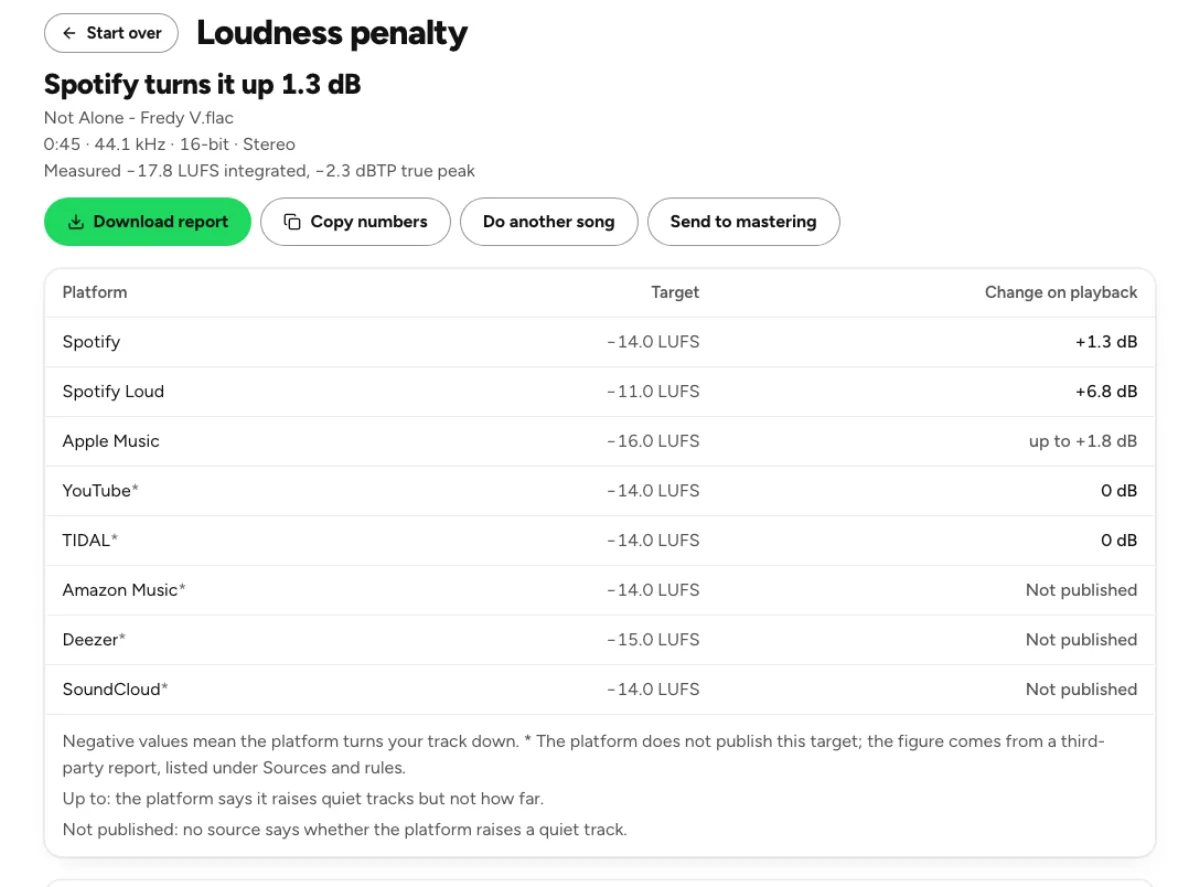
The platform table relates your file’s measured integrated loudness to the playback targets recorded in the tool. A negative change means estimated turn-down, not a fee, a quality score or a punishment for making energetic music. Read the number beside the source note and the measured true peak. The loudness penalty checker predicts a gain adjustment from these rules; it does not upload your music to a streaming service or observe the exact behavior of a listener’s account.
Different platforms, different confidence
The table distinguishes published platform guidance from third-party target reports and marks uncertainty rather than pretending all services document every detail. Quiet-track handling can differ from loud-track turn-down, and a service may apply headroom limits or a particular playback mode. The source notes are therefore part of the result. Revisit them before a release instead of treating a remembered target as permanent. An estimate is most useful when its assumptions remain visible and you understand the listening context.

Approximate listening-device curves
The phone, laptop, earbuds, car and Bluetooth previews use hand-set EQ curves for broad device classes. Mono offers another useful check on a wide mix. These are listening prompts, not measurements of a particular product, vehicle or room. The preview uses a short loud section so switching remains easy. A problem revealed by the curve is worth investigating on actual equipment; a flattering preview does not certify that every listener’s speakers will reproduce the same balance. When comparing versions, keep the musical section and monitoring level consistent. A different passage or an accidental player-volume change can overwhelm the relatively small difference you are trying to judge. Note which export produced the table, especially if you later change limiting or encode a compressed delivery. A normalization estimate belongs to the measured file and represented playback rule, rather than to a song title regardless of version. That makes saved comparison notes more useful when you revisit the release later.
Who checks playback normalization
Mastering engineers comparing tradeoffs
Compare a louder master and a more open alternative after considering their estimated playback adjustment. If both arrive at a similar listening level, the question becomes how their transients, density and tonal balance feel. Normalization does not rebuild dynamics removed earlier by limiting. Use the report to explain that tradeoff to a collaborator, then make the decision with matched listening rather than assuming the version with the smallest turn-down must automatically be the better master.

Artists checking a release file
Use the same bounce you plan to give the distributor. Check the table, read the file’s loudness and true peak, then audition the device curves for obvious balance problems. If a vocal disappears on the phone approximation, confirm it on a real small speaker before revising the mix. The page helps you ask better release questions; it does not replace the destination’s delivery specification or guarantee how normalization will be configured on every playback application.
Beatmakers testing translation
Dense low end and very wide effects can sound impressive on studio headphones while losing definition on simpler playback systems. Compare the laptop or phone curve and try the mono option. Listen for the musical role of the bass and the intelligibility of the main hook. If something vanishes, return to arrangement, stereo placement or EQ choices as appropriate. Raising the entire master may leave that balance problem intact while reducing the available peak headroom.
How to read a loudness penalty report
Measure the intended master
Drop the final audio file and allow the browser to scan it. The analysis runs on your device, so you do not need to upload the recording to estimate normalization. Use a complete song when checking release playback: a loud chorus excerpt may have a different integrated value from the full track. Note the source version and export settings if you are comparing revisions, particularly when one is lossless and another has already been encoded for delivery.
Read the sign and the rule
Look at whether the gain change is negative, zero, positive or qualified by an uncertainty label. Turn-down is usually straightforward arithmetic; turning quiet audio up may depend on the service’s headroom rule. Do not read an unknown value as proof that nothing happens. Open the source notes to see the assumption behind a row, and keep the distinction between a calculated estimate and a platform’s actual current behavior in a particular player.
Listen before deciding to remaster
Play the available section and switch through the approximate device curves. The transition helps compare tonal emphasis, but it cannot reproduce physical speaker distortion or the acoustics of a real room. If you hear a concern, test it on a longer passage in your normal playback setup. Return to the studio only when you have a reason to change the master. Re-run the analysis on the revised export to see what changed rather than guessing from a louder preview.
Streaming loudness and device-preview questions
What is a loudness penalty?
It is the estimated amount of playback gain reduction needed to approach a service’s normalization target. A negative number indicates turn-down. The term does not imply that the service rejects your master or charges a penalty. Your file is unchanged by this page; it is a calculation and listening aid for deciding how a finished recording may be played.
Should I master until every row shows zero?
No. Different targets and quiet-track rules can make that impossible or musically unhelpful. A track can sound good while being turned down, and a track near a target can still have poor balance or distortion. Choose a master for its musical quality and delivery requirements. Use the table to understand gain behavior, not as a universal scoring system.
Will normalization fix an over-limited master?
A gain reduction makes the whole waveform quieter. It does not restore transients, remove audible distortion or reverse compression already printed into the audio. Compare a less limited alternative at a similar listening level if you are unsure. The normalization estimate tells you about playback level; the sound of the mastering decisions remains a separate question.
Do services always turn quiet tracks up?
No universal rule applies. The table distinguishes documented gain increases, headroom restrictions and cases where the behavior is unknown or not published in its sources. Playback modes can also matter. Read the row’s qualification and source rather than assuming a quiet file will be boosted to a precise level everywhere, or that a zero estimate proves the file is already ideal.
Are the phone and car previews accurate simulations?
They are deliberately approximate EQ curves for broad categories, not calibrated models of real products. They can expose dependence on deep bass, strong upper mids or stereo width, but they omit many physical and environmental effects. Confirm important decisions on actual equipment. The label describes a useful listening perspective rather than a certification of playback compatibility.
Can I use this instead of a LUFS meter?
The checker uses loudness measurement to answer a narrower question about estimated playback changes. Use the LUFS meter when you need the detailed readings, full-file loudness graph or a measurement report. The tools complement one another: one describes the recording’s measured properties, while the other relates those properties to recorded playback assumptions.
Does the check use a cloud run?
The measurement and device previews happen in the browser. The local check does not submit your song to a separation or generation provider. Your device needs enough memory to decode the file and prepare playback, so a large recording may take longer. Choosing a separate cloud operation afterward has its own upload, quota and processing behavior.
Why might a real service play my song differently?
Account settings, album versus track playback, normalization modes, platform changes and the delivered encoded version can all affect the comparison. The checker follows the rules represented in its table and source notes. Verify the current destination guidance before release and use actual playback to confirm an important decision. Keep the result as an informed estimate rather than a guaranteed prediction for every listener.
Learn how
Guides and tutorials that use this tool, with real screens and real numbers.