
Metadata editor
Edit title, artist, ISRC and cover art in MP3, FLAC, WAV, AIFF and M4A files, in batches.
- Runs in your browser. Nothing is uploaded.
- Space plays AB switch versions
You get the same audio with your new tags and cover.
MP3 · FLAC · WAV · AIFF · M4A · OGG · Opus · up to 2 GB per file · JPEG or PNG covers up to 10 MB
Runs in your browser. Nothing is uploaded.
How it works
- What it does
- Title, artist, album, track, year, genre, ISRC, BPM, key and cover art for MP3, FLAC, WAV, AIFF, M4A (AAC and Apple Lossless), Ogg Vorbis and Opus files, in batches, in your browser.
- What gets written
- MP3 gets an ID3v2.3 tag (Latin-1, or UTF-16 for other scripts) or, if you choose, ID3v2.4 with UTF-8 text; frames Rifflo does not manage are kept. FLAC gets Vorbis comments and a PICTURE block; the audio frames are copied byte for byte. WAV gets a LIST/INFO block plus an id3 chunk, AIFF an ID3 chunk. M4A is remuxed with the packets copied (Apple Lossless is edited in place), so the audio is untouched; iTunes freeform atoms such as MusicBrainz IDs and ReplayGain are kept, and ISRC and key are written the way iTunes-compatible taggers write them. Ogg Vorbis and Opus get a new comment header, with every audio page copied. ISRC is checked against ISO 3901 before it is written.
Organize the information inside audio files
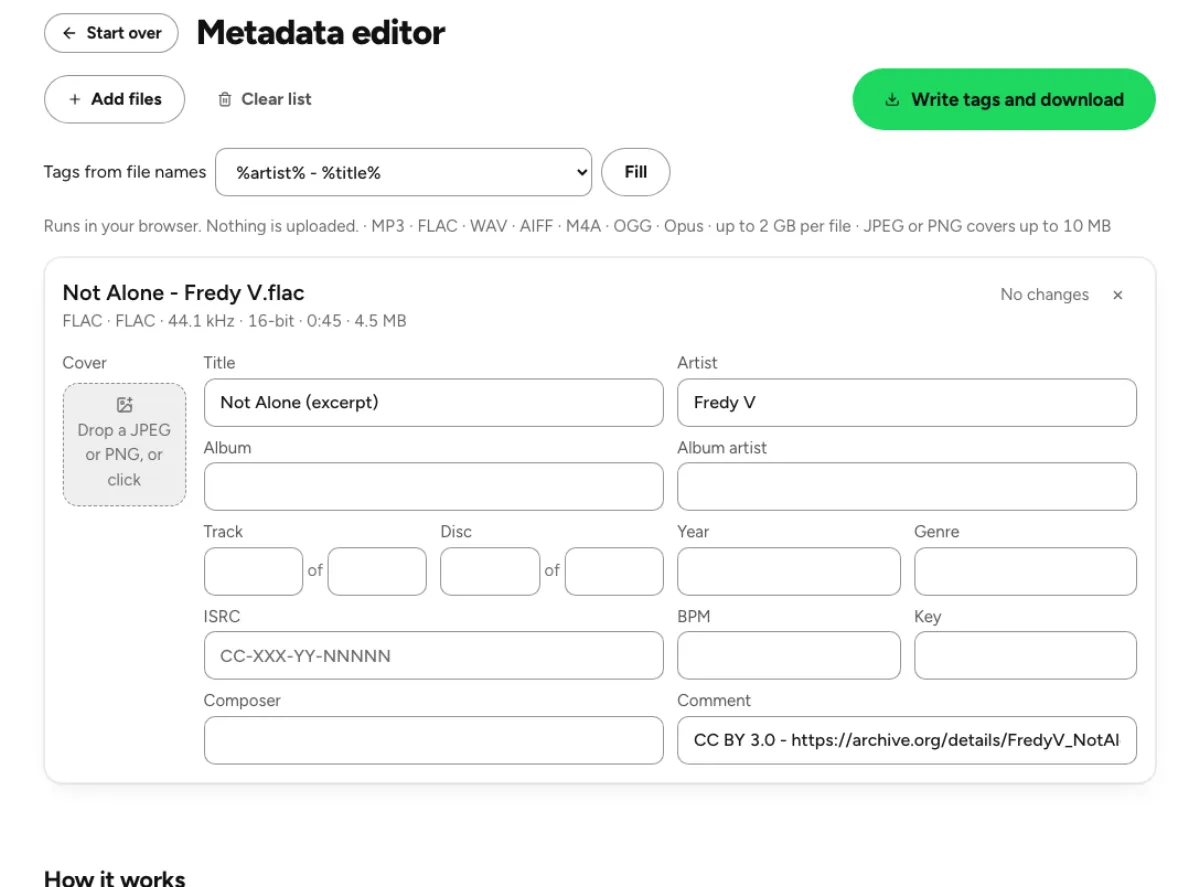
Release fields in one place
Read existing tags and edit fields such as title, artist, album, album artist, track and disc numbers, year, genre, composer, comment, BPM, musical key and ISRC. The card shows what you changed before writing a new copy. These fields describe a recording; they do not change the music or automatically update a release already distributed elsewhere. A player may display a different subset of the stored tags, so verify important fields in the software or service that will receive the files.

Shared album information without repeated typing
Apply to all copies the shared album fields and cover from a completed card to the other loaded files. This is useful for a release whose tracks share an album title, year, artist context and artwork. Review track-specific fields individually, particularly titles, track numbers and recording identifiers. A batch action saves repetition, but it cannot know whether two files are different recordings or whether a compilation needs different track artists. Inspect the complete list before downloading the written results.
Tags change while audio stays intact
The tag writers preserve the encoded audio rather than rendering the song through an audio effect. Supported containers include MP3, FLAC, WAV, AIFF, M4A, Ogg and Opus; their tag structures differ. MP3 offers ID3 version choices for compatibility, while M4A can use freeform fields for information such as musical key. A new container layout or file size does not imply a new performance. The goal is to update descriptive information without introducing another lossy audio generation. Treat a metadata round trip as a small compatibility check. Write one representative file, reopen it and inspect it in the intended player before applying the same choices to an entire library. Test text with accents or non-Latin characters when those occur in your release, and make sure the correct cover is displayed. A player that caches an old title may need a rescan. Keeping separate source and edited folders makes that verification easier and prevents uncertainty about which copy you actually opened.
Who needs consistent music metadata

Artists preparing an EP or album
Load the release files together and establish consistent spelling, capitalization and artwork before sharing them. A common album artist helps libraries keep a release together, while each track title and number still needs review. Check the downloaded files in the player or delivery application you use. Embedded tags are only one part of release preparation; a distributor may also require separate forms, artwork assets and identifiers. Editing a tag does not complete those external steps for you.

DJs organizing a music library
Store a verified BPM or key alongside artist and title so the information can travel with the file. The metadata editor writes values you provide; it does not analyze the recording to establish that those values are correct. Use the key and BPM finder when you need an estimate, listen to confirm it and then enter the chosen information. Different DJ applications may interpret or cache tags differently, so refresh their library and check a saved test file first.
Labels checking recording identifiers
Review each ISRC against your release records before writing it. The editor checks the code’s format and can normalize its presentation, but a syntactically valid code is not proof that it was assigned to this recording. Do not generate a new identifier merely by changing a tag. Keep a record of the source file and intended metadata, then verify the written copy. Batch album fields can be shared, while identifiers and version titles often require careful per-track handling.
How to edit and verify tags
Load supported files and inspect existing tags
Drop the recordings and wait for a card for each file. Container detection uses the content of the file rather than trusting only its extension. Compare the shown title, artist and artwork with your expectations before making changes. The operation happens locally, so large files need working memory on your device. If a file is corrupt or uses an unsupported structure, keep the original and resolve that problem before treating the tag editor as a repair tool.
Edit shared fields and individual exceptions
Fill in the desired fields, add a JPEG or PNG cover within the displayed image limit and use Apply to all only for the information that really belongs to every track. Then revisit titles, numbers, comments, BPM, keys and identifiers individually. Choose an MP3 tag version according to the players you need to support. A clean metadata set is consistent without erasing meaningful differences such as featured artists, alternate mixes or separate recording dates.
Write new copies and check the receiving player
Write one file or complete the batch and download its ZIP. The original filenames help identify the results, so save them into a clearly marked folder instead of accidentally mixing source and edited copies. Open a representative output in the destination player, check the artwork and inspect important fields. Some libraries cache old metadata until refreshed. If a field is missing there, distinguish a reader limitation or cache from a failure to save the value inside the file.
Metadata, artwork and identifier questions
Can I edit metadata without losing audio quality?
The tag-writing paths copy the encoded audio rather than applying a new audio encode. That avoids a lossy generation merely to change a title or cover. The file’s metadata structure and total size can still change. Keep the original and verify an output when exact preservation and player compatibility matter, especially for an unfamiliar or unusually tagged container.
Can I add cover art to an MP3?
Yes. Add a JPEG or PNG within the displayed size limit, then write and download the file. The cover becomes embedded metadata, rather than a separate image beside the song. Check it in your intended player because display behavior and preferred image dimensions vary. Choosing clear, appropriately sized artwork is more useful than embedding the largest possible image.
Does Apply to all overwrite every field?
It copies the shared album information represented by that action, including the album-related fields and cover. Track-specific details still need review. Do not assume that every title, track number or identifier should become identical across the release. Start with one completed card, apply the shared values and then inspect the individual recordings before writing the batch.
Can I write Ogg and Opus tags?
Yes. The current writers update the comment metadata in supported Ogg and Opus files while copying their audio pages. This is different from older versions that only read those tags. Container support does not guarantee every player displays every field, so check a saved file in the library or application you will use rather than relying on the editor’s view alone.
Can M4A store a musical key?
The current M4A handling reads and writes a freeform musical-key field used by compatible tagging applications. Support in a receiving player can vary because this is not displayed uniformly everywhere. Test a representative saved file with your actual music software. A tag that exists inside the container may still be ignored or cached by a particular reader.
Does a valid ISRC mean I own or registered the recording?
No. The editor validates the structure of the value you enter; it does not assign recording rights, register a release or verify ownership. Use the identifier assigned through your legitimate release process and check it against your records. Writing an incorrect but well-formed code into a file can still create confusion for a collaborator or delivery system.
Should I choose ID3v2.3 or ID3v2.4?
Choose according to the devices and software that must read your MP3 tags. The editor provides version choices because older readers can behave differently from modern ones. Save a test file with non-English text and artwork when compatibility matters, then inspect it in the target player. Avoid rewriting an entire archive before confirming that the chosen version suits your workflow.
Are my files uploaded or changed in place?
Tag reading and writing happen in your browser, and downloading saves new copies. The editor does not upload the music for tagging or overwrite source files on your drive. Keep the source folder until you have checked the outputs. For a batch, verify that the ZIP contains every expected track and that you are importing the edited copies into your library.
Learn how
Guides and tutorials that use this tool, with real screens and real numbers.
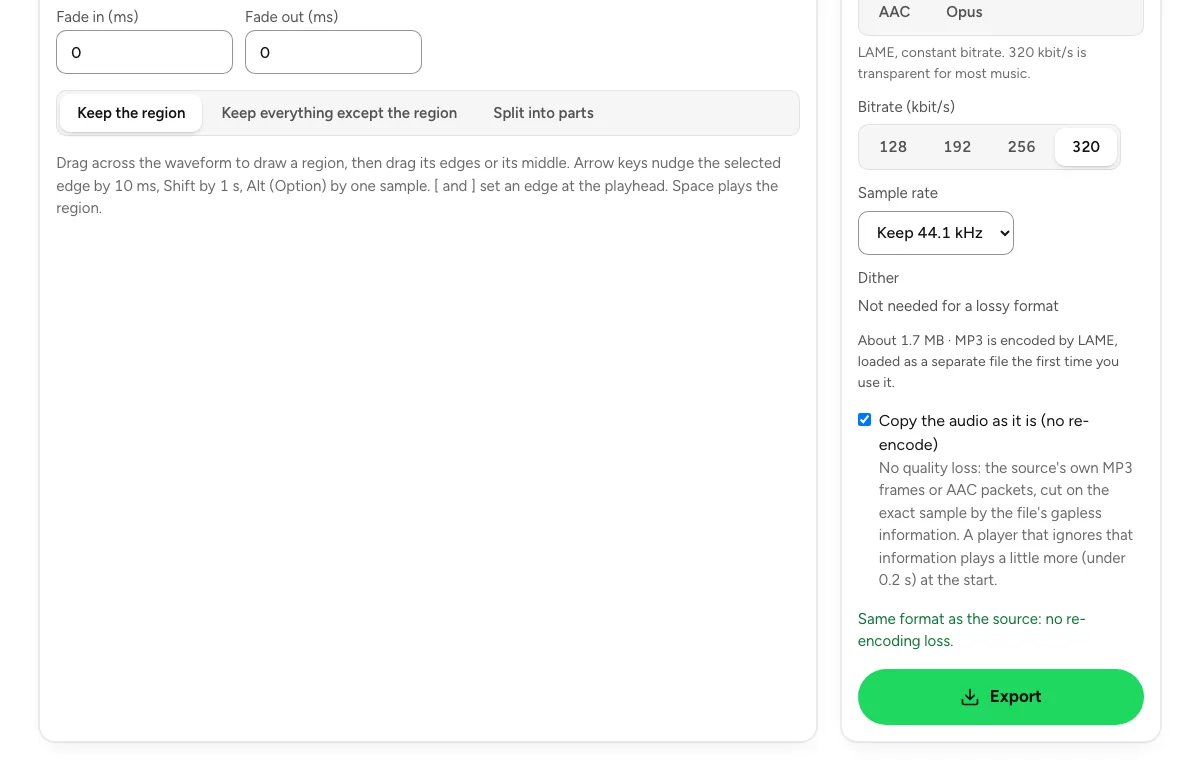 Cut an audio file and export it without re-encodingFour steps on the audio cutter: load, mark the region, keep the source format with the fades at 0, export. Which files stay lossless, and which cannot.
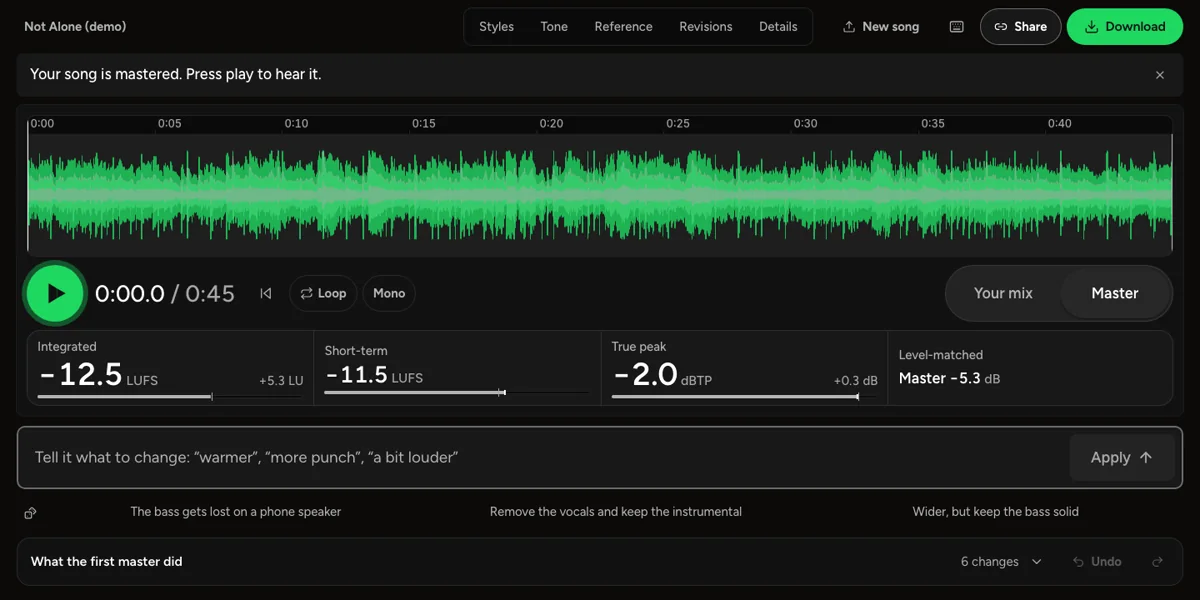 How to master a track before releaseWhat mastering changes, how loud a song should be for streaming, and how to check your master the way Spotify, Apple Music and a phone speaker will play it.